Security and privacy
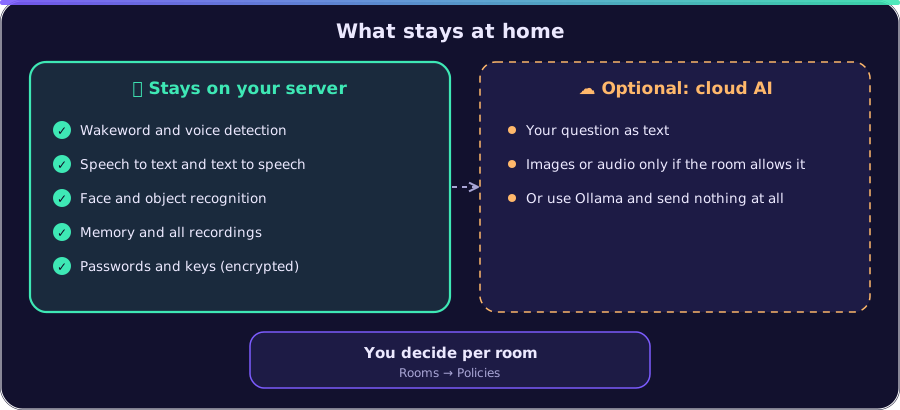
JuStAI has access to cameras, microphones and personal information. The principles: local first, minimal permissions, nothing silent (cloud fallbacks and security-relevant actions are logged), deterministic rules instead of model decisions for output and permissions.
Network and containers
Section titled “Network and containers”| Measure | Implementation |
|---|---|
| Two ports to the outside | core:8080 (HTTP, UI/API) and core:8443 (HTTPS, same application, for the device app). Postgres, go2rtc and sandbox are not reachable from outside. |
| Internal database network | db is internal: true |
| Sandbox without network | sandbox is internal: true: no internet, no LAN, only the core. Checked: Postgres, go2rtc, LAN and internet are not reachable from the sandbox. |
| Hardened sandbox | read-only root FS, tmpfs /tmp, cap_drop: ALL, no-new-privileges, pids/mem/cpu limits, own UID (10002), rlimits per plugin process |
| Core without root | UID 10001 |
| go2rtc without credentials on disk | streams are created in memory at runtime (PATCH /api/streams), go2rtc.yaml is mounted read-only and contains no cameras |
| Talkback endpoint | /internal/talkback/<random token>.wav, token per speaker, only meant for go2rtc |
For access from the internet: do not expose JuStAI directly, but use a VPN (e.g.
WireGuard) or a reverse proxy with TLS. Then set JUSTAI_PUBLIC_URL to https://… so
cookies are marked Secure.
HTTPS with a local certificate authority
Section titled “HTTPS with a local certificate authority”For the device app (microphone and camera in the browser) the core speaks HTTPS on port
8443 (backend/src/justai/tls.py):
- At the first start an own certificate authority is created in
/data/tls(ECDSA P-256, 10 years,pathLen 0). Its private key never leaves the container (file0600) and belongs in the backup. - The server certificate contains
localhost,127.0.0.1,justai.local,JUSTAI_TLS_NAMESand the addresses added in the UI; validity 825 days (Apple limit), automatic reissue 30 days before expiry or when the names change. New addresses are loaded without a restart. GET /api/tls/ca.crt(public, only the CA certificate),GET /api/tls/statusandPOST /api/tls/names(admins only). The SHA-256 fingerprint is shown in the admin UI for comparison on the device.- Whoever installs the CA certificate trusts all certificates this CA issues. Therefore:
do not pass on the CA key, install the certificate only on your own devices.
JUSTAI_TLS_ENABLED=falseswitches HTTPS off.
Paired device apps authenticate with their random token (the core only keeps the hash). A browser device can only register display, audio and camera capabilities. Media only flow over the connection of the paired device.
Authentication (admin UI/API)
Section titled “Authentication (admin UI/API)”- Passwords: Argon2id (argon2-cffi), rehash on changed parameters; minimum length 8.
- Initial admin password: randomly generated, only in
/data/initial_admin_password.txtand once in the log (or set withJUSTAI_ADMIN_PASSWORD). - Sessions: JWT (HS256, key derived from the master key), as an
HttpOnly,SameSite=Strictcookie or as a bearer token. Sign out everywhere increments the user’s token version and invalidates all old tokens. - CSRF: writing requests need the header
x-justai: 1. A foreign form cannot set it without a CORS preflight; CORS is off by default. - Brute force protection: after 5 failed attempts within 15 minutes, login is blocked
per user name and per client address: first 30 s, then doubled up to 15 min. Failed
attempts are in the audit log (
auth.login_failed). - Security headers for all responses: Content-Security-Policy (scripts only from the own
server, no foreign frames),
X-Frame-Options: DENY,X-Content-Type-Options: nosniff,Referrer-Policy: no-referrer.
Roles and permissions
Section titled “Roles and permissions”Roles admin, resident, guest (auth/rbac.py), permission vocabulary from the SDK.
Spoken conversations are not authenticated. A session gets the default_role of its
endpoint (default resident; set it to guest in publicly accessible places). A
recognised person can raise the permissions at most to resident. Biometrics never
grant administrative rights: system.manage, devices.manage, identity.manage,
devices.provide and ai.provide are always excluded in conversations.
Residents may operate devices by voice (devices.control: privacy mode, listening pause,
reconnect, test tone) but not add or configure them. Guests can do neither.
Tools declare required permissions and side effects. Consequential actions
(requires_confirmation) are only carried out by the assistant after an explicit
confirmation: deleting memories, deleting automations, registering a face and others. The
confirmation is bound to session and arguments, must come in a later user turn (the
model cannot confirm itself) and expires. Every tool execution is logged (parameters
redacted).
Secrets
Section titled “Secrets”secrets-initcreates DB password, master key and sandbox token in the volumesecretsat the first start (master key only readable by the core, 0400).- Plugin secrets (
secret_fields) and device credentials are stored encrypted with Fernet in the database (key from the master key). The API never returns them, the UI only shows “set”. - Logs: a structlog processor and
common/redact.pyremove known key names (password, token, api_key, …) and credentials in URLs (rtsp://user:pass@→rtsp://***@). - Backups contain secrets and are written with
chmod 600(DEPLOYMENT.md).
Plugins and generated code
Section titled “Plugins and generated code”- Uploaded plugins are always
untrusted, run in the sandbox and start without permissions until an admin grants them (PLUGINS.md). - Network access only through the core gateway to the hosts of the allowlist; private, loopback, link-local and multicast addresses are blocked (also after DNS resolution).
- Self-developed plugins (
tools.develop): the code is checked statically (forbidden modules likeos,subprocess,socket,importlib; forbidden calls likeeval,exec,open,getattr), tested in the sandbox, then reviewed for security by a model and only activated after approval by an admin. It always becomes anuntrustedplugin with a restricted permission list (never device control, LAN or system settings). Background jobs run at most every 60 s, at most 5 per plugin. API keys a plugin needs are entered by the admin and stored encrypted. The core itself is never changed. Versions, rollback and disabling in the admin UI under Tools → Development (PLUGINS.md).
Privacy
Section titled “Privacy”| Topic | Implementation |
|---|---|
| Cloud AI | can be switched off globally; per role local_only/prefer_local/any; separate switches for camera images, conversation audio and personal memories; per room cloud_media_allowed. Web search (Gemini → Google Search) can be switched off; its queries go to Google. A switch from local to cloud is never silent: event ai.provider.fallback and audit entry. |
| Visibility | displays show whether the room is being listened to or spoken to and whether a cloud realtime model is active. The admin UI shows this for all rooms. |
| Cameras | privacy zones are blacked out before every analysis; vision can be switched off per room; no camera images stored with sightings; privacy mode by voice (“switch off the camera”) |
| Microphones | listening can be paused per room by voice (“stop listening for an hour”) or switched off per endpoint |
| Biometrics | face and voice only with documented consent (separately per trait); revoking deletes all traits of that kind; export possible; similarity values are never shown as a probability (VISION.md) |
| Memory | provenance visible, private memories only for their person, forgetting is permanent (MEMORY.md) |
| Audio | no audio is stored. Exception: explicitly requested diagnostic recordings (max. 30 s, download) |
| Voice comparison | for “continue the conversation?” a voice fingerprint is calculated from the wakeword and speech of a conversation: only in memory, not assigned to any person, discarded after the continuation window; the speech data itself is deleted right after the calculation. Can be switched off per endpoint (speaker_check). |
| Personal output | not on displays in shared rooms |
Retention
Section titled “Retention”Adjustable under Settings → Retention; a daily job deletes older data:
| Data | Default |
|---|---|
| durable events | 90 days |
| conversation transcripts | 365 days |
| sightings | 60 days |
| tool log | 90 days |
| display presentations | 30 days |
| finished jobs | 14 days |
Audit log
Section titled “Audit log”GET /api/audit and admin UI → Diagnosis → Audit log: logins and failed attempts,
changes to users, plugins (installation, permissions), settings, devices, automations,
memory, biometrics, cloud fallbacks, network search, PTZ tracking, display presentations,
device operations by voice (privacy mode, listening pause, image analysis).
Known limits
Section titled “Known limits”- Spoken commands are not authenticated. Whoever speaks in the room has the permissions of
the endpoint. For sensitive rooms choose
default_role: guest. - Face recognition can be fooled with photos (no liveness detection), voice recognition with recordings. That is why both only serve personalisation, never authorisation.
- The sandbox is container isolation with rlimits, not a VM. For code of unknown origin this is one protective layer, not a free pass.
- The brute force protection keeps its state in memory; a restart resets it.