Devices
A device is a physical or virtual device with capabilities. Devices are independent of endpoints: a camera can supply image and microphone, the speaker can be another device (ROOMS.md).
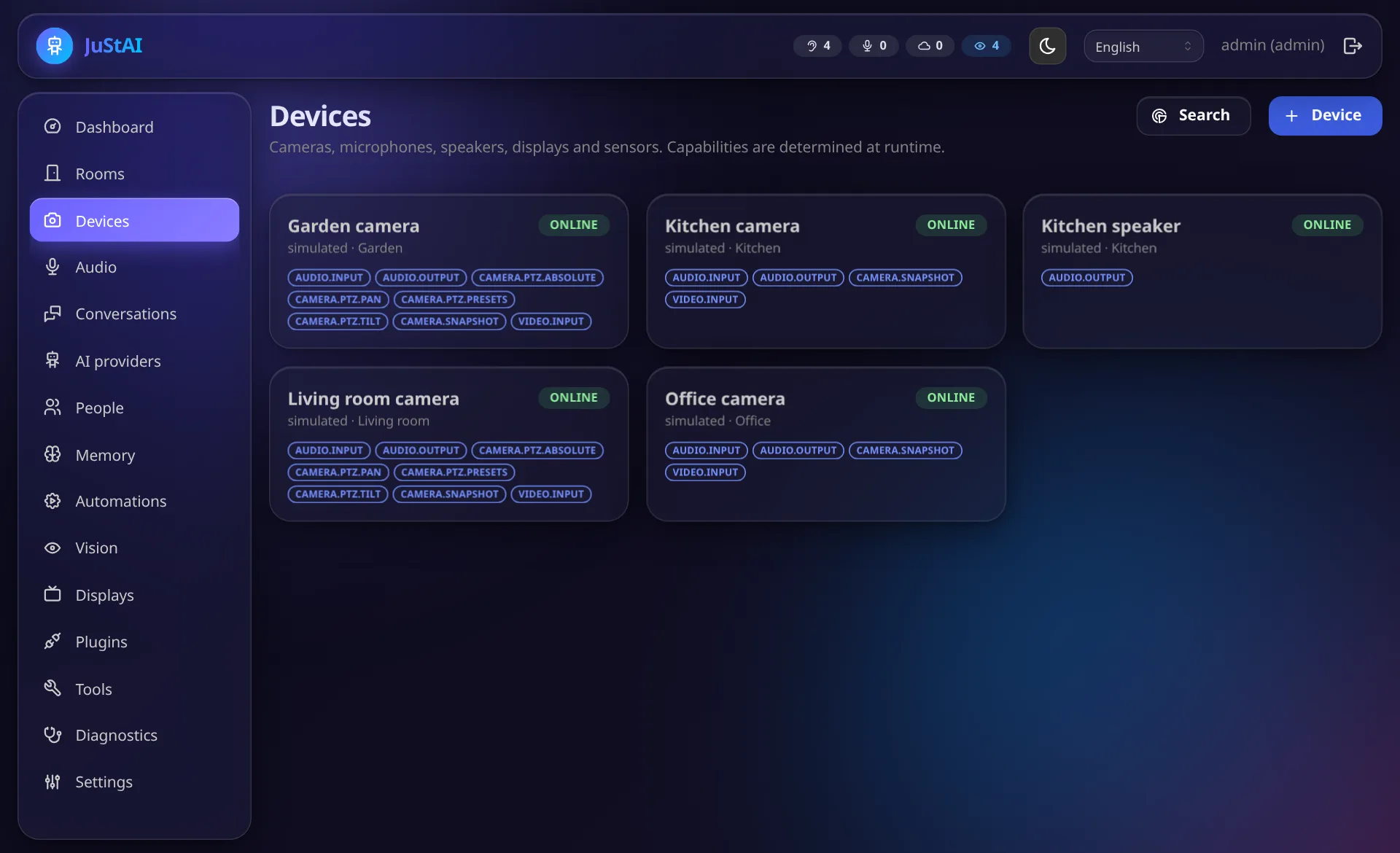
Capabilities
Section titled “Capabilities”Defined in justai_sdk/ports/devices.py (Capability). They are determined at
runtime (probe when adding and on every connection), not guessed from the model name:
video.input, audio.input, audio.output, audio.full_duplex, camera.snapshot,
camera.ptz.pan|tilt|zoom|presets|absolute, camera.motion_events,
camera.privacy_mode, display.text|image|dashboard|video|interactive|notifications|fullscreen,
sensor.motion, sensor.contact.
Whether a stream actually contains audio is measured by the core through go2rtc
(probe_medias), not taken from manufacturer data.
Adding
Section titled “Adding”- Network search (admin UI → Devices → Search): Tapo (port signature), ONVIF
WS-Discovery (unicast to all hosts of the range, because multicast usually does not get
out of Docker bridge networks), mDNS. Only ranges the admin has allowed under Settings
→ Network search are scanned, and only private networks (
devices/discovery.py). - Manually: choose a driver, fill in the form built from the driver’s
config_schema, Test (probe without saving) and Save.
Credentials are stored encrypted. go2rtc streams with credentials are only created in
memory by the core (PATCH /api/streams); they never end up in go2rtc.yaml
(ADR 0004).
Tested cameras and help wanted
Section titled “Tested cameras and help wanted”| Camera | Status | What was verified |
|---|---|---|
| TP-Link Tapo C200 (pan/tilt, mains powered) | ✅ tested on real hardware | video, snapshots, microphone and speaker (two-way audio), wakeword → answer through the camera speaker, echo calibration, pan/tilt, privacy mode |
| TP-Link Tapo C410 (battery, no pan/tilt) | ⚪ untested | was mostly asleep and unreachable during testing, so nothing could be verified. RTSP/ONVIF support and the speaker are unchecked; being a battery camera it may sleep between events, which matters for use as a microphone |
| Other Tapo models | ⚪ untested | the tapo driver should work with models that offer the Tapo stream, but nobody has checked yet |
| Other ONVIF / RTSP cameras (Reolink, Hikvision, Dahua, Amcrest, …) | ⚪ untested | the onvif driver is implemented and covered by unit tests, but has not been run against real cameras other than a Tapo. Video and snapshots will most likely work; speaker (backchannel) and PTZ depend on the model |
Nothing else has been tried on real hardware. Please do not buy a camera for JuStAI because of this table alone: the speaker is the critical part. A camera without a working audio backchannel can still be used as microphone and eyes, with the answer coming from another device (a tablet, a display, a smart speaker).
Please try your own camera
Section titled “Please try your own camera”Every camera that speaks ONVIF or RTSP is worth a try (Devices → Search or
+ Device, driver onvif). Reports are very welcome, also negative ones:
- Open an issue with the template Camera report: model, firmware, which driver, and what worked (video, microphone, speaker, PTZ).
- Say which capabilities the device dialog shows after the test (video, microphone, speaker, PTZ) and add relevant log lines. Remove passwords and addresses before posting.
- A short note on what did not work is more useful than silence. Many models differ only in small details (stream path, audio codec, ONVIF profile).
Help to support more cameras
Section titled “Help to support more cameras”New cameras are added through device driver plugins, small Python packages without any
change to the core. The two existing ones, tapo and onvif (folder plugins/), are the
templates. You do not have to write everything by hand: describe the camera to an AI coding
assistant and follow Vibe coding. Typical contributions:
- a model profile for the ONVIF driver (stream path, audio codec, backchannel quirks),
- a new driver for a vendor with its own protocol (Reolink, Eufy, Xiaomi, …),
- a fix or a test for a camera that almost works.
Pull requests and plugins are welcome in JuStAI; see Plugins for the interfaces and Development for the test setup. Not sure where to start? Open a Discussion with the camera model.
Drivers
Section titled “Drivers”TP-Link Tapo (tapo)
Section titled “TP-Link Tapo (tapo)”| Field | Meaning |
|---|---|
host |
IP/hostname |
cloud_password |
Tapo cloud password: Tapo stream with two-way audio and local control (PTZ, presets, privacy mode) |
password_hash |
alternatively the hash of the cloud password – enough for the stream incl. talkback, not for local control |
camera_username / camera_password |
camera account from the Tapo app: RTSP and ONVIF (PTZ via ONVIF port 2020) |
stream |
tapo (default, with backchannel) or rtsp (without speaker) |
horizontal_fov_deg / vertical_fov_deg |
field of view for PTZ tracking (default 95°/54°) |
Tested with real hardware:
- C200: video, snapshots, fMP4 live stream, microphone and speaker via go2rtc
tapo://. The camera mutes its microphone while its speaker plays (hardware half duplex). Calibration detects this: no echo arrives, the conservative latency stays active. Measured end-to-end latency playback → microphone: about 1.8 s. Barge-in during output is physically impossible with this device. - PTZ of the C200: via the local Tapo API (cloud password) or ONVIF (camera account).
The C200 firmware does not know
getMotorCapability; panning is therefore detected via the preset API (only pan/tilt models have it), alternatively via ONVIF. The local API occasionally fails while connecting (pake_share failed); then ONVIF takes over. Tested: pan right and back from the admin UI and the API. - Privacy mode of the C200: on and off by voice (“switch off the camera in the office”), state checked directly on the camera. Needs the cloud password.
- C410 (battery camera): was mostly unreachable during testing (sleeping), so it could not be verified. Whether it offers RTSP/ONVIF and a usable speaker is open; as a battery camera it may sleep between events, which limits its use as a permanent microphone.
ONVIF / RTSP (onvif)
Section titled “ONVIF / RTSP (onvif)”Two device types:
- ONVIF:
host,port(Tapo: 2020),username,password,backchannel, field of view. Stream URLs, PTZ capabilities and presets are determined via ONVIF. - RTSP:
url(without credentials), optionallysub_url,username,password,backchannel(ONVIF Profile T backchannel via go2rtc if the camera supports it).
Simulated (simulated)
Section titled “Simulated (simulated)”For development, tests and demos without hardware: camera (image from a file),
microphone and speaker, optionally PTZ. The speaker feeds its output back into the
microphone with echo_delay_s/echo_gain (room acoustics, noise, optionally
hardware_ducking like the C200). With the tool simulator.say a simulated user (Piper
voice) “speaks” into one or several rooms at once (also_devices, also_gain), so that
e.g. wakewords reaching two rooms at the same time can be heard.
Can be switched off with JUSTAI_ENABLE_SIMULATED_DEVICES=false.
Browser display (browser-display)
Section titled “Browser display (browser-display)”Created when pairing a display client or the device app (DISPLAYS.md). With the device app it supplies microphone, speaker and camera depending on the selection and can thus be used in an endpoint like a camera with microphone.
Operating devices by voice
Section titled “Operating devices by voice”Everyday operations are tools of the assistant (tools/builtin/control.py). They need the
permission devices.control (roles resident and admin; never sandbox plugins).
Adding devices and changing credentials stays in the interface.
| Tool | Example | Effect |
|---|---|---|
devices.privacy_mode |
“Switch off the camera in the bedroom”, “all cameras off”, “camera back on” | privacy mode of cameras with camera.privacy_mode (no image, no sound) |
audio.listening |
“Stop listening in the bedroom for an hour” | switches off the wakeword of the room’s endpoints; a one-time automation switches it on again after the pause (1 minute to 24 hours, survives restarts) |
devices.reconnect |
“The camera in the office makes no sound, reconnect it” | reconnects a device or all devices of a room |
devices.test_speaker |
“Test the speaker in the kitchen” | short test tone |
vision.analysis |
“Stop analysing the living room camera” | local image analysis of a camera off/on (permission vision.manage); the camera keeps running |
Without a device name the room of the conversation is meant. Every action is recorded in the audit log.
Drivers offer the privacy mode through handle.privacy() (protocol PrivacyControl with
get() and set(enabled)); the Tapo driver uses pytapo with the same lock as PTZ.
Disabling instead of deleting
Section titled “Disabling instead of deleting”In the device dialog top right: switch Enabled. A disabled device keeps configuration, credentials, room and endpoint assignment, but JuStAI does not connect: no stream in go2rtc, no microphone, no image analysis, no output to it. Endpoints show the device as “(disabled)”, the audio diagnosis reports that the endpoint is not listening. After enabling, the device is online again within a few seconds (C200 tested: ~6 s).
Deleting, by contrast, also removes credentials and assignments. Endpoints whose devices were deleted remain and are marked “no devices” under Rooms.
Status and reconnection
Section titled “Status and reconnection”The DeviceManager keeps one runtime per device (handle, capabilities, status
online/connecting/offline/disabled/no_driver). If a device fails, it reconnects
with backoff; status changes create device.status.changed. The talkback path reconnects
automatically. When stopping (disable, delete, reconnect) every step (audio, vision,
driver, go2rtc streams) has at most 10 s; a hanging part does not block the others and
appears as device step timed out or supervised task did not stop (with the place where
it waits) in the log. Endpoints with missing devices report their state in the UI instead
of falling back to other rooms.
Diagnosis
Section titled “Diagnosis”POST /api/devices/{id}/test-tone: test tone through the speaker (via the output router)GET /api/devices/{id}/snapshot.jpg,GET /api/devices/{id}/live.mp4(live video in the device dialog: starts automatically, stays at the live edge, ends the camera connection when closed)- Admin UI → Audio: level, VAD, wakeword score, echo window, duplex mode per endpoint
- Admin UI → Diagnosis: event stream, telemetry, audit log