JuStAI
JuStAI turns ordinary cameras, microphones, speakers and screens into one shared, locally run AI assistant. Rooms and interaction endpoints decide where it listens and where it answers; a deterministic output router keeps answers in the room of the request. The assistant never reacts to its own voice. It speaks and understands English, German and Italian, and its interface is available in all three languages.
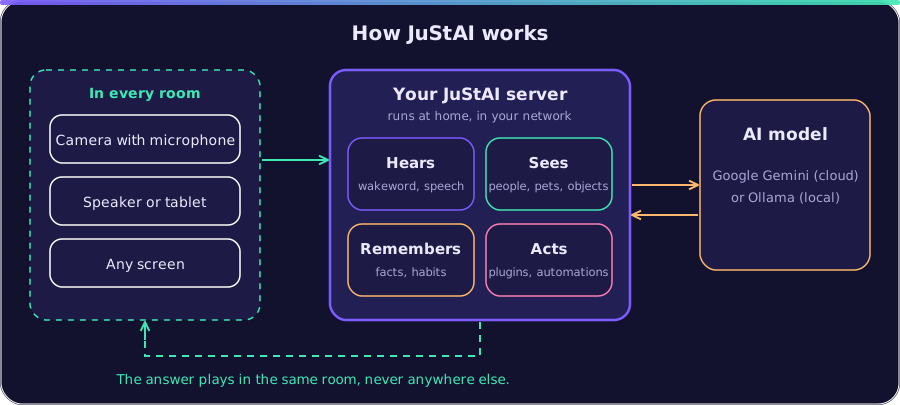
camera/microphone ──► go2rtc ──► audio engine (AEC, VAD, wakeword, arbitration) │ ▼ conversation session ──► AI router (realtime | STT→LLM→TTS) │ │ ▼ ▼ output router ◄──── tools (memory, vision, PTZ, display, …) │ speaker / display in the same roomWhat you can do with it: “The next time you see me from tomorrow 9 am, remind me to take out the rubbish.” · “Where are my car keys? Search the pool house.” · “Where is Lucky?” · “Tell me when a car drives into the driveway.” · “Switch off the camera in the bedroom.” · “Build a plugin that tells me when electricity is cheaper than 20 cents.” More: docs/EXAMPLES.md.
Installation
Section titled “Installation”One command on a Linux machine (x86_64) installs everything, Docker included, and only asks for an API key and an admin password:
curl -fsSL https://raw.githubusercontent.com/naxeu/justai/main/scripts/install.sh | bashStep by step, no prior knowledge needed: docs/INSTALLATION.md (install Docker, API key, start, phone as microphone, cameras, people).
By hand, when Docker is already there (Compose ≥ 2.24):
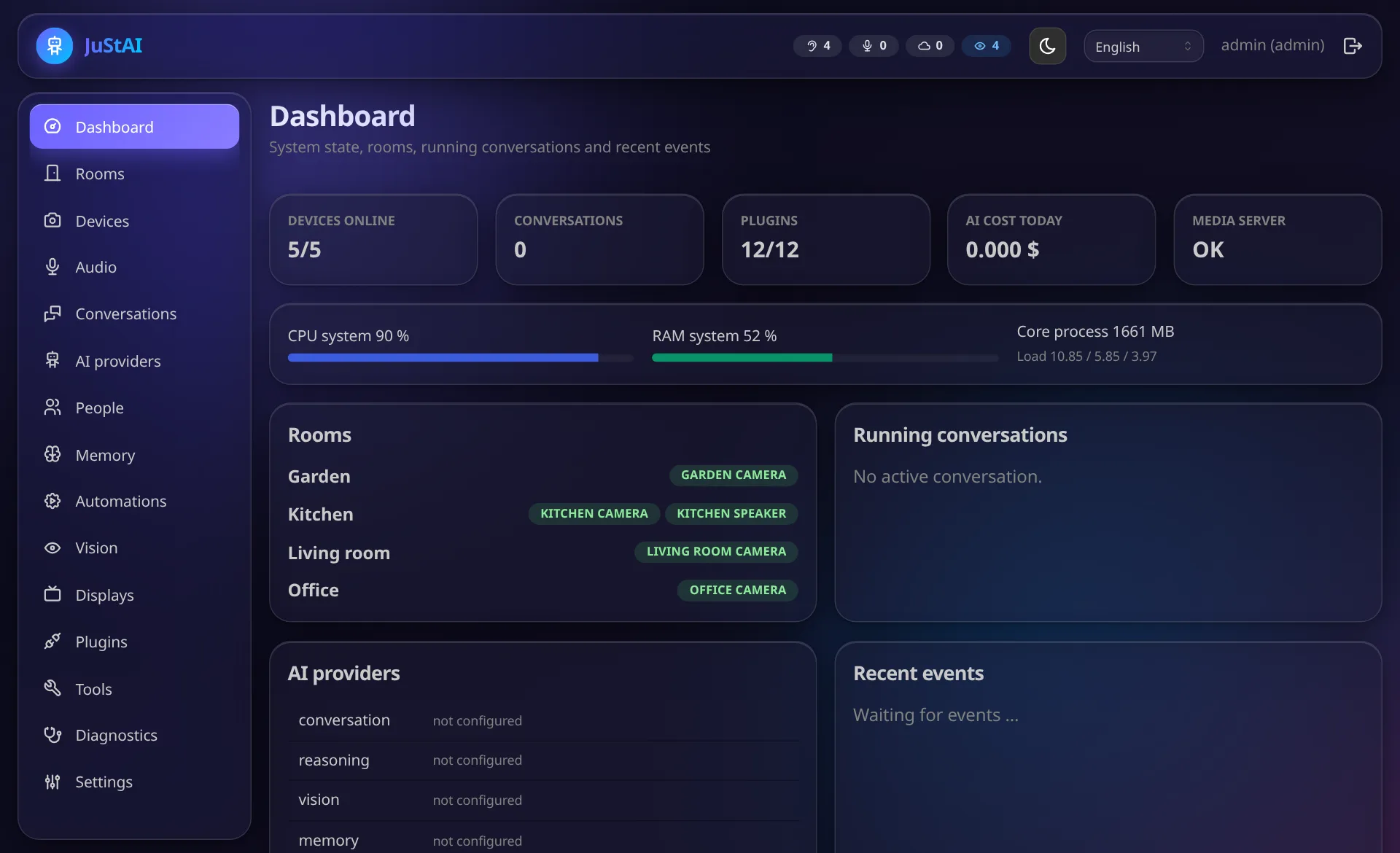
git clone https://github.com/naxeu/justai.gitcd justaicp .env.example .env # set GOOGLE_API_KEY=… (or later in the interface)docker compose up -d --build- Admin interface: http://localhost:8080
- User
admin; after the first start the initial password is in/data/initial_admin_password.txtin the core container:
docker compose exec core cat /data/initial_admin_password.txt- Display client (open it e.g. on a TV/tablet and pair it in the admin interface under Displays with the code shown): http://HOST:8080/display
- Device app: phone, tablet or PC as microphone, speaker, camera and screen, installable as an app: https://HOST:8443/app (set up under Settings → Device app, see docs/DISPLAYS.md)
Wakeword, speech recognition, speech output, embeddings and image analysis run locally
(openWakeWord, faster-whisper, Piper, fastembed, OpenCV). The answers need a language
model: either a Google API key (GOOGLE_API_KEY=… in .env, see .env.example, or in
the admin interface under Plugins → Gemini), which fills all roles at once; or a local
LLM (e.g. Ollama through the OpenAI-compatible plugin) assigned to the roles under
AI providers (docs/AI.md).
First steps
Section titled “First steps”- Create rooms (e.g. living room, kitchen).
- Add devices – by network search (ONVIF/mDNS/Tapo) or manually. Without hardware: driver simulated (simulated device with acoustic echo).
- Endpoints: combine microphone and speaker (optionally camera/display) of a room into an endpoint and run Calibrate.
- Say “Hey Justy”. Answers come from the speaker of the same endpoint.
Documentation
Section titled “Documentation”| Topic | File |
|---|---|
| Installation step by step | docs/INSTALLATION.md |
| Examples: what you can ask | docs/EXAMPLES.md |
| Architecture, modules, data flows | docs/ARCHITECTURE.md |
| Technology decisions | docs/TECH_STACK.md, docs/adr/ |
| Development | docs/DEVELOPMENT.md |
| Build it further yourself (vibe coding) | docs/VIBE_CODING.md |
| Plugins & SDK, self-developed plugins | docs/PLUGINS.md |
| Devices (Tapo, ONVIF, RTSP, simulated), voice control | docs/DEVICES.md |
| Rooms & endpoints, output router | docs/ROOMS.md |
| Audio: AEC, VAD, wakeword, arbitration, duplex | docs/AUDIO.md |
| AI providers, roles, fallbacks, privacy, languages | docs/AI.md |
| Vision, identity | docs/VISION.md |
| PTZ tracking | docs/PTZ.md |
| Memory | docs/MEMORY.md |
| Automations | docs/AUTOMATIONS.md |
| Displays and device app | docs/DISPLAYS.md |
| Security & privacy | docs/SECURITY.md |
| Operation, backup, update | docs/DEPLOYMENT.md |
| Tests & test status | docs/TESTING.md |
The German documentation is in docs/de/. The English version is the reference; the German one is kept up to date but may lag behind.
Project structure
Section titled “Project structure”backend/ core (Python 3.12, FastAPI) – src/justai/<module>sdk/python/ plugin SDK (justai_sdk): manifest, ports, tools, events, test helperssandbox/ sandbox service for untrusted pluginsplugins/ bundled plugins (drivers, AI providers, example plugin)frontend/ admin interface and display client (React, Mantine, Vite); translations in src/shared/i18ndocker/ Dockerfiles, secret initialisationgo2rtc/ base configuration of the media server (without credentials)scripts/ installation, model download, backup, restoredocs/ documentation and ADRs (docs/de: German)Status
Section titled “Status”What was checked with real hardware and what is only simulated is stated honestly in docs/TESTING.md.
Licence
Section titled “Licence”Copyright (C) 2026 Julian Stricker
JuStAI is licensed under the GNU Affero General Public License v3.0 (AGPL-3.0). You may use, change and distribute the code. Whoever offers a changed version as a network service must also publish the source code of their changes under the AGPL.
Exceptions:
- The plugin SDK (sdk/python) is MIT-licensed so plugins can be licensed freely.
- The bundled plugins state their licence in their
plugin.yaml.
Third-party components keep their own licences. This also applies to the models that
scripts/fetch_models.py downloads (for example the pretrained openWakeWord wake words and
the Piper voices). Check their terms before using them commercially.
Contributions are currently not planned. The copyright holder reserves the right to also license the code under other terms.